An internal link audit helps you understand how pages across your website connect, which important pages are poorly supported, where broken links exist, and whether your site structure makes it easy for both users and search engines to discover your most valuable content.
Internal links are more than navigation.
They help search engines discover pages, understand relationships between topics, and interpret the context of destination pages through anchor text.
A useful internal link audit should answer questions such as:
- Which important pages have too few internal links?
- Are valuable pages effectively orphaned?
- Are links pointing to deleted or redirected URLs?
- Are important pages buried too deep in the site?
- Is anchor text descriptive and relevant?
- Are related articles properly connected into topic clusters?
- Are pages already receiving Google impressions getting enough internal support?
If you are reviewing internal links as part of a wider site audit, start with the Technical SEO Foundation guide.
What Is an Internal Link Audit?
An internal link audit is a structured review of links between pages on the same website.
The objective is not simply to count how many links each page has.
Instead, the audit helps identify weaknesses in site architecture and opportunities to connect important content more effectively.
A typical internal linking audit checks:
- Broken internal links
- Orphan pages
- Pages with very few incoming links
- Redirecting internal URLs
- Crawl depth
- Anchor text
- Topic cluster connections
- Important pages receiving weak support
- Dead-end pages
- Missed contextual link opportunities
A page can technically be indexed and accessible while still receiving almost no meaningful support from the rest of the website.
That is one reason internal linking should be reviewed as part of your broader website health strategy.
For WordPress sites, the WordPress Site Health guide provides a broader checklist.
Why Internal Linking Matters for SEO
Internal links help search engines discover content and understand how pages relate to each other.
They also help communicate which pages are more important within the overall structure of a website.
For example:
Technical SEO → Indexing → Canonical Tags → Robots.txt → XML Sitemaps
This creates a much clearer relationship than publishing several unrelated articles with no internal connections.
Strong internal linking can support four important areas.
Page Discovery
Search engines follow crawlable links to discover URLs.
A page may appear in an XML sitemap, but if nothing on the website links to it naturally, it can still be poorly integrated into the site structure.
Site Architecture
Internal links help organise related content.
They make it easier for both users and crawlers to understand which pages belong to the same topic.
Page Priority
Not every URL deserves equal internal support.
Product pages, service pages, pillar content and high-opportunity resources usually deserve stronger linking than minor utility pages.
User Journey
Internal links also help visitors move naturally from one useful page to another.
Someone reading about indexing issues may next need information about technical SEO, site health or crawlability.
Step 1: Build a Priority URL List
Do not begin the audit by treating every page equally.
First identify which URLs matter most to your website.
These may include:
- Product pages
- Service pages
- Pillar articles
- Pages receiving Google impressions
- Commercial pages
- High-performing resources
- Pages ranking close to page one
- Pages that generate leads or sales
You can classify them into three groups.
High Priority
Revenue pages, products, services, pillar content and pages with strong search opportunities.
Medium Priority
Supporting evergreen articles and useful resources.
Low Priority
Utility pages, outdated content, low-value archives and pages with little strategic importance.
This prevents you from spending hours improving internal links to pages that provide little SEO or business value.
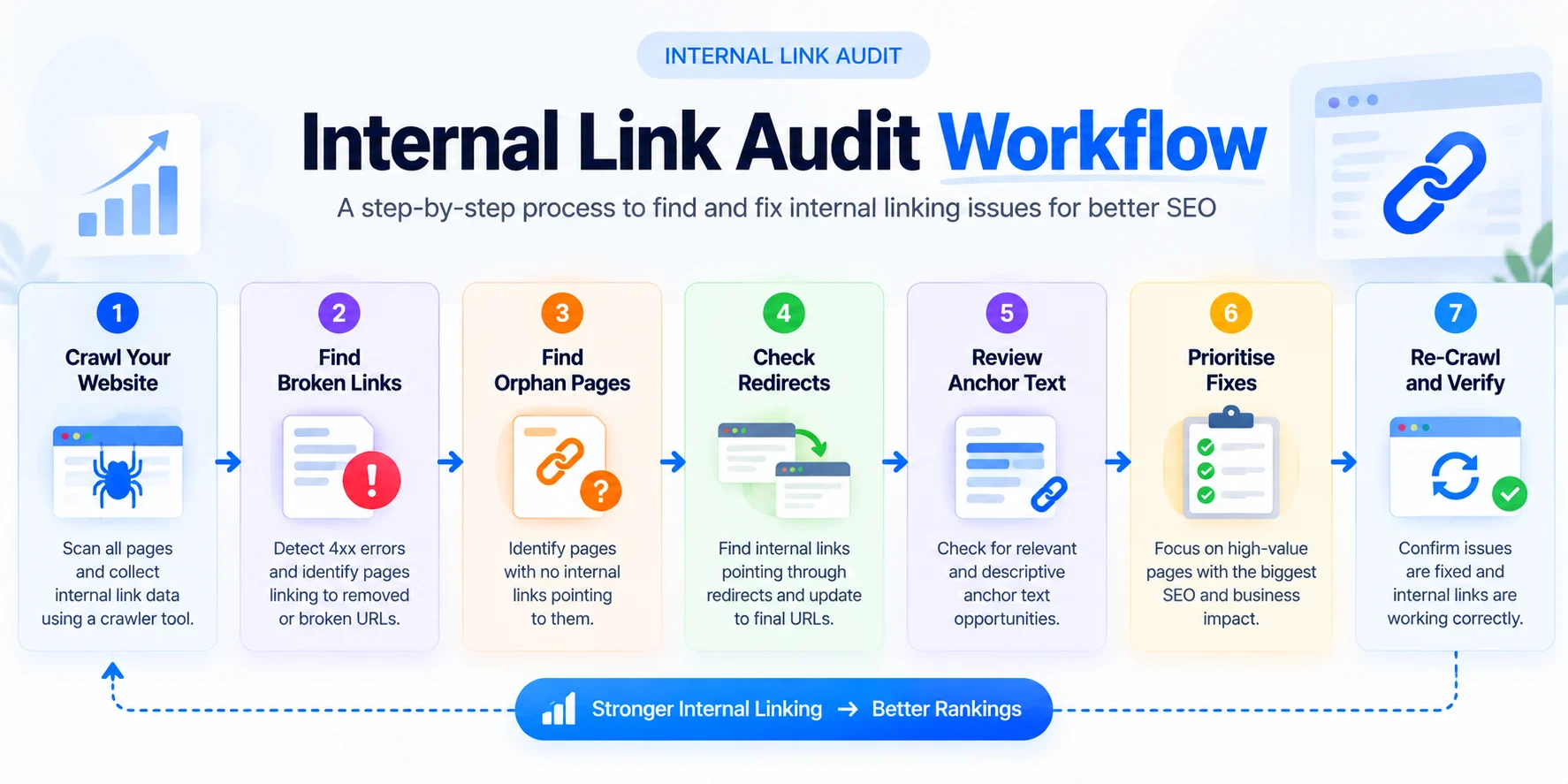
Step 2: Crawl Your Website
The next step is to crawl the website using a tool that can export internal-link information.
Popular options include:
- Screaming Frog
- Sitebulb
- Ahrefs Site Audit
- Semrush Site Audit
Useful data to export includes:
- URL
- HTTP status
- Number of internal inlinks
- Number of outlinks
- Anchor text
- Crawl depth
- Canonical URL
- Indexability
This creates the basic internal-link map of your website.
Step 3: Find Broken Internal Links
Broken internal links send visitors and crawlers to URLs that no longer work.
Common causes include:
- Deleted articles
- Changed URLs
- Removed products
- Typing mistakes
- Old campaign pages
Look for internal destinations returning 4xx status codes.
Then identify which pages are linking to them.
The fix normally involves one of three actions:
- Update the link to the correct live page
- Remove the link if it is no longer useful
- Redirect the old destination if a genuine replacement exists
Avoid redirecting every broken URL to the homepage.
The replacement should remain relevant to the original destination.
Step 4: Find Internal Links Pointing Through Redirects
A 301 redirect is useful when a page permanently moves.
However, internal links should ideally point directly to the final URL.
For example:
Old link: /seo-guide/
Final URL: /resources/seo-guide/
The cleaner internal link is the final destination.
This removes an unnecessary redirect hop and makes future site maintenance easier.
Redirects are especially common after redesigns, permalink changes and content restructuring.
Step 5: Find Orphan Pages
An orphan page is a page with no meaningful internal links pointing to it.
It may still be:
- Listed in your sitemap
- Indexed by Google
- Receiving external links
- Accessible directly
But it is disconnected from the normal internal structure of the website.
A practical workflow is:
- Export URLs from your XML sitemap.
- Crawl your site by following internal links.
- Compare both lists.
- Look for sitemap URLs that were not discovered in the normal crawl.
You can also compare:
- Sitemap URLs
- Google Search Console pages
- Analytics landing pages
- Crawler exports
This can reveal pages that exist but are not properly connected.
Not every orphan page needs to be saved.
Before adding links, ask whether the page is still valuable.
An orphan page may be:
- Outdated
- Duplicated
- A temporary landing page
- Low-value content
- Better merged with another page
If the page matters, connect it.
If it does not, consider consolidating, redirecting or removing it.
Step 6: Find Under-Supported Priority Pages
Not every weak page is completely orphaned.
A page may have one internal link and still receive very little support.
This is often more important than finding true orphan pages.
Compare:
Page Importance vs. Internal Link Support
For example, a major product page with one contextual link deserves more attention than an old article with the same number of links.
Look especially at:
- Product pages
- Service pages
- Pillar guides
- Pages ranking around positions 8–30
- Pages receiving impressions but few clicks
These are often good internal-link opportunities.
Step 7: Review Crawl Depth
Crawl depth refers to how many clicks are required to reach a page from a starting point such as the homepage.
A deeply nested page is not automatically bad.
Large websites naturally have deeper structures.
However, important pages should not be unnecessarily difficult to reach.
Check whether priority pages are:
- Hidden behind several category levels
- Accessible only through pagination
- Linked from one obscure page
- Missing from relevant category or hub pages
Do not obsess over a fixed “three-click rule.”
A better question is:
Is this page harder to reach than its importance justifies?
Step 8: Audit Internal Link Anchor Text
Anchor text is the clickable wording used to link to another page.
Useful anchor text clearly describes the destination.
Weak examples:
- Click here
- Learn more
- Read this
- More information
Better examples:
- Technical SEO foundation
- WordPress site health
- Internal link audit
- Google indexing issues
- Website SEO audit
For example, instead of writing “learn more here,” use a descriptive phrase such as Technical SEO Foundation.
This gives users and search engines much more context.
Avoid using the exact same anchor keyword repeatedly.
Natural variations are usually better.
Step 9: Check Topic Cluster Connections
Internal linking becomes especially important when you use a pillar-and-cluster content strategy.
For example:
Internal Linking for SEO — Pillar
Supporting cluster articles could include:
- How to Do an Internal Link Audit
- How to Find Orphan Pages
- How to Fix Broken Internal Links
- Internal Link Anchor Text Best Practices
- Internal Linking for WordPress
- How Internal Links Help Google Discover Pages
These articles should not exist as isolated posts.
Supporting articles should link naturally to:
- The parent pillar
- Closely related supporting articles
- Relevant products where appropriate
The pillar should also link back to the supporting articles.
This creates a clearer topic structure and helps users move between related resources.
Step 10: Use Google Search Console to Find Quick Wins
This is where an internal link audit can become more useful for traffic growth.
Do not simply fix pages alphabetically.
Open Google Search Console and identify pages that already have:
- Impressions
- Rankings around positions 8–30
- Valuable search queries
- Increasing visibility
- Strong business relevance
Then compare those pages with your internal-link data.
Ask:
Does this page receive enough relevant internal support?
For example, a page ranking at position 12 with hundreds of impressions but only one contextual internal link may deserve attention before a page receiving no search visibility.
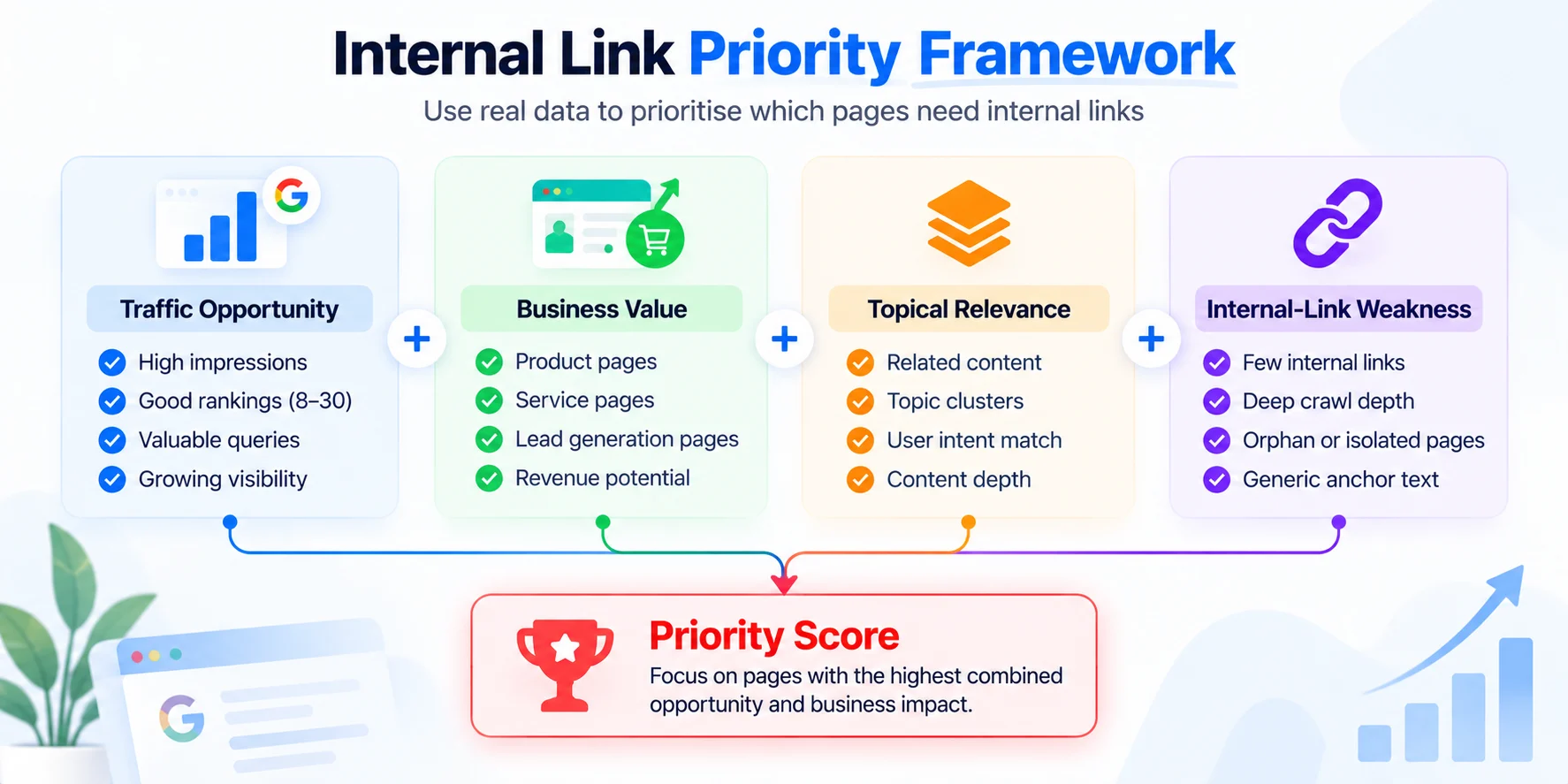
A simple prioritisation model is:
Traffic Opportunity + Business Value + Topical Relevance + Internal-Link Weakness
The stronger the combination, the higher the priority.
Step 11: Link Strong Pages to Priority Pages
Identify existing pages that already have strength.
These may include pages with:
- Organic traffic
- Backlinks
- High impressions
- Strong rankings
- Evergreen relevance
Then look for natural opportunities to connect those pages with relevant priority content.
Do not randomly insert links simply because one page has authority.
The source and destination should be contextually related.
Step 12: Review Dead-End Pages
A dead-end page receives internal traffic but provides few useful next steps.
Ask:
What should a reader logically do after finishing this page?
Useful next destinations may include:
- A related guide
- The parent pillar
- A product page
- A deeper tutorial
- A comparison article
The goal is not to force people through endless pages.
It is to make useful next steps available.
Step 13: Check Whether Internal Links Are Crawlable
Search engines need to be able to follow your internal links.
Standard HTML links using an anchor element and href are usually the safest implementation.
For most WordPress websites, links created through the normal editor work correctly.
However, custom JavaScript interfaces and unusual theme elements may require additional testing.
If broader crawlability problems exist, review the Technical SEO Foundation guide.
Step 14: Prioritise the Fixes
After completing an audit, you may have dozens or hundreds of recommendations.
Do not fix them randomly.
A practical order is:
- Broken links affecting important pages
- Valuable orphan pages
- High-priority pages receiving weak internal support
- Internal links pointing through outdated redirects
- Crawl-depth problems affecting important content
- Weak topic-cluster connections
- Generic anchor text
- Lower-priority structural improvements
This keeps the audit focused on likely SEO and business impact.
Step 15: Re-Crawl the Website
After making changes, crawl the website again.
Confirm that:
- Broken links are resolved
- Redirecting internal links are reduced
- Priority pages gained relevant internal links
- Valuable orphan pages are connected
- Crawl depth improved where appropriate
- Anchor text is clearer
- No new linking errors were introduced
An internal link audit is not complete until the changes are verified.
How Many Internal Links Should a Page Have?
There is no universal ideal number.
The right number depends on:
- Page length
- Topic complexity
- User intent
- Site structure
- Number of genuinely useful related pages
The better rule is simple:
Add a link when it helps the reader or clarifies the relationship between pages.
Do not add links simply to reach a target number.
Best Tools for an Internal Link Audit
Google Search Console
Useful for:
- Finding high-impression pages
- Identifying ranking opportunities
- Reviewing search queries
- Checking indexing
It is especially useful for deciding which internal-link fixes deserve priority.
Screaming Frog
Useful for:
- Inlinks
- Outlinks
- Broken links
- Redirects
- Crawl depth
- Anchor text
- Orphan-page workflows
Sitebulb
Useful for:
- Visualising site architecture
- Crawl paths
- Technical SEO issues
- Internal linking relationships
Ahrefs or Semrush
Useful for combining internal-link analysis with:
- Backlinks
- Rankings
- Organic keywords
- Site audit information
No tool can decide which pages matter most to your business.
That still requires judgement.
Internal Link Audit Checklist
Before completing the audit, confirm:
- Important pages have relevant internal links
- Valuable orphan pages are connected
- Broken internal links are fixed
- Internal links point directly to live URLs where practical
- Priority pages are reasonably easy to reach
- Anchor text describes destinations clearly
- Related articles form logical topic clusters
- Strong older pages support relevant newer content
- Search Console opportunities are considered
- Changes have been re-crawled and verified
Common Internal Linking Mistakes
Adding Links Everywhere
More links do not automatically improve SEO.
Links should be relevant and useful.
Only Linking New Articles to Old Content
When publishing new content, many websites add links from the new page to existing articles.
But they forget to update older strong pages so those pages link back to the new content.
That creates one-way relationships.
Relying Only on Navigation Links
A page may technically be linked from a menu but still receive almost no contextual support.
Relevant in-content links can make topic relationships clearer.
Ignoring Redirected Internal URLs
Redirects are useful and sometimes necessary.
However, direct internal links to final URLs are cleaner when practical.
Using the Same Exact Anchor Everywhere
Descriptive anchor text is useful.
Repeating one exact keyword across every internal link is unnecessary.
Use natural variations.
Frequently Asked Questions
What is an internal link audit?
An internal link audit reviews how pages on the same website connect and identifies problems such as orphan pages, broken links, weak page support, excessive crawl depth and unclear anchor text.
How do I find orphan pages?
Compare URLs from your sitemap, Search Console or analytics with URLs found during a normal website crawl.
Important pages that exist in your URL inventory but cannot be discovered through internal links may be orphaned.
Can internal links improve SEO?
Internal links can help search engines discover pages, understand site structure and recognise relationships between topics.
They also help users navigate between relevant content.
Should I update internal links that point through redirects?
A functioning redirect will still take users to the final page.
However, pointing internal links directly to the current URL is cleaner and removes an unnecessary redirect hop.
How often should I perform an internal link audit?
Smaller websites may review internal links every few months or after major content changes.
Larger publishing or ecommerce sites may benefit from more frequent reviews.
Which pages should receive the most internal links?
Focus on pages that matter most to your users and business, including products, services, pillar content and pages with proven organic-search opportunities.
Should every article link to a product page?
No.
Only link to a product when it genuinely helps the reader solve the problem discussed in the article.
Final Thoughts
A useful internal link audit is not about creating as many links as possible.
It is about creating a clearer structure.
Start with the pages that matter most.
Then identify:
- Broken paths
- Valuable orphan pages
- Weakly supported priority pages
- Redirecting internal links
- Crawl-depth problems
- Poor anchor text
- Missing topic-cluster connections
Use Google Search Console data to decide what deserves attention first.
If a page already receives impressions, targets a valuable keyword and matters to the business but receives almost no internal support, it may represent a better opportunity than randomly adding links across the site.
The final goal is a website where users and search engines can clearly understand what your important pages are, how your topics connect, and where to go next.